ArchiveFlow Studio
A node-based Workspace for personal digital archives, metadata, relationships, and export workflows.
ArchiveFlow Studio is a cross-platform desktop app built with C#, .NET 10, and Avalonia. Its core is a node-based Workspace canvas. The Desktop Full Version uses local SQLite, repositories, a metadata editor, graph explorer, import/export pipelines, and job logs. The Browser Workspace Demo is published to GitHub Pages with Avalonia WebAssembly and uses built-in sample data plus in-memory storage for online review.
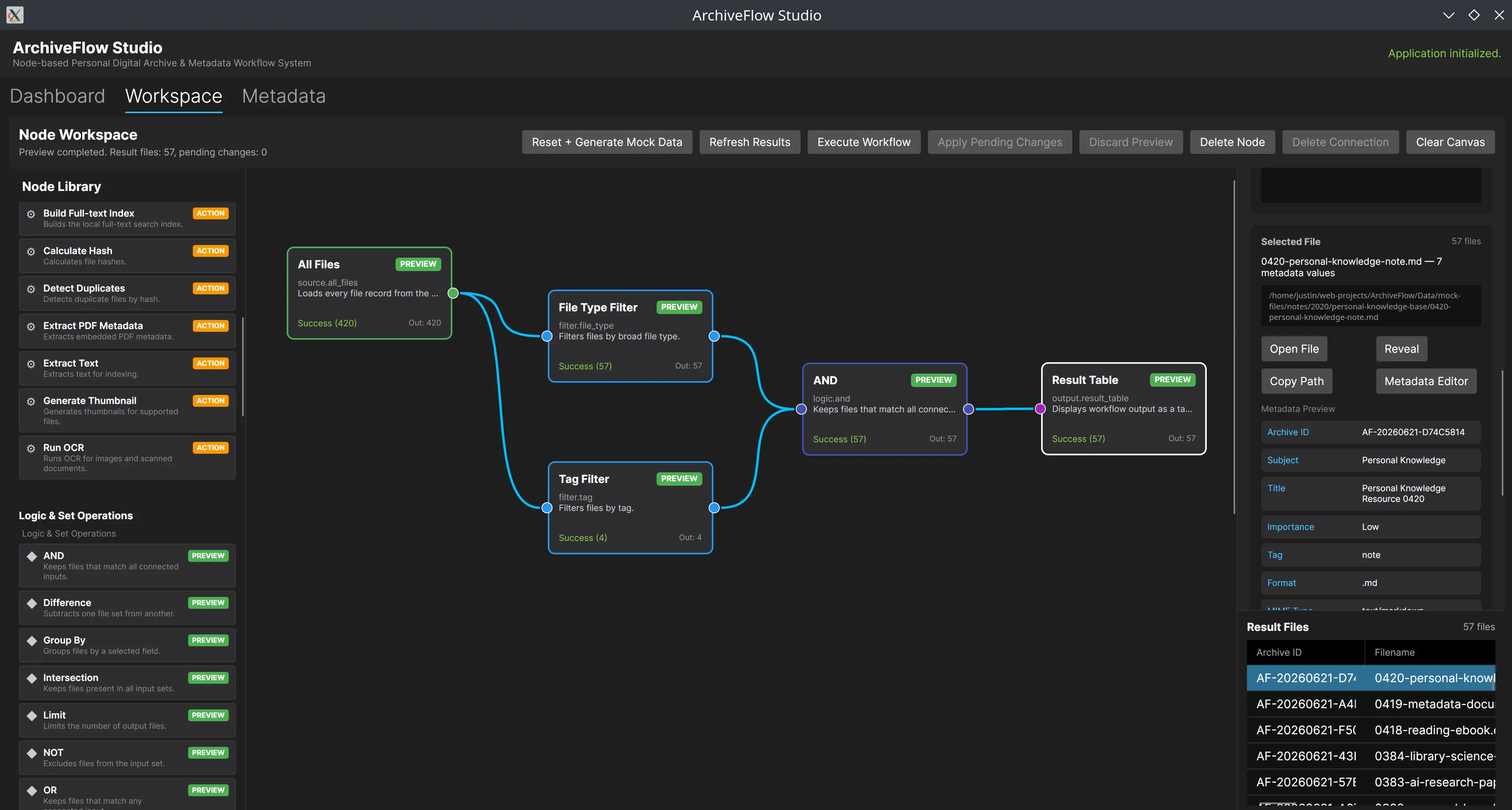
Browser Workspace node canvas demo
The Browser Demo uses Demo Mode to show the node canvas, inspector, result table, mock import/export, and metadata preview/apply workflow.
Media overview
Browse the project screenshots.
Project links and demo readiness
live
Workspace Browser Demo
Open the verified live demo when available, or use the internal run guide for manual demo preparation.
github
View GitHub
Open the public repository when available, or review the source-access status captured by this case study.
documentation
README
Open the project README when available, or use this case study as the documentation baseline.
Project overview
ArchiveFlow Studio is one of my strongest examples of combining library and information science, metadata workflow design, desktop UI, and practical engineering. It is not just a file list. It turns a personal digital archive workflow into an interactive node-based Workspace. The complete product direction is represented by the Desktop Full Version, including local persistence, file import, metadata editing, relationship creation, graph exploration, and export history. The Browser Workspace Demo is a WebAssembly version for portfolio review. It does not scan the visitor's computer, write to a local SQLite database, or export to arbitrary folders. Instead, it uses built-in sample data to simulate the main workflow safely. The demo opens on the Workspace canvas so reviewers immediately see how source, filter, search, metadata action, and result nodes connect. The inspector explains the selected node, while the result table and pending changes show the effect of executing the workflow. This keeps the online experience focused on the product's core interaction without pretending the browser version is the full desktop app.
My role
Independent Developer / Metadata System Designer / .NET + Avalonia Engineer
Problem
Personal and small-organization digital files often live in scattered folders without consistent metadata, relationship context, batch processing workflows, or exchangeable archive formats.
Solution
I designed a node-based Workspace where users can connect file sources, filters, search nodes, metadata actions, relationship operations, and outputs into previewable and repeatable workflows. The Browser Demo preserves that interaction model with simulated data so it stays safe inside the browser sandbox.
Current outcome
The project now has a Desktop Full Version and a Browser Workspace Demo: the desktop app keeps full local capabilities, while the web demo lets reviewers directly try the node canvas, inspector, result table, mock import/export, and metadata preview/apply flow online.
Highlights
- The Browser Demo opens directly into the Workspace canvas with a node library, draggable nodes, inspector, result table, and pending changes.
- The desktop app keeps local SQLite, Metadata Editor, Graph Explorer, Import Pipeline, and Export Job Log capabilities.
- Platform-specific behavior is separated through service abstractions instead of scattered browser/desktop checks.
- GitHub Pages deploys the static wwwroot produced by Avalonia WebAssembly publish, not a desktop executable.
Engineering challenges
- The browser sandbox cannot scan arbitrary local folders, write a native SQLite file, or use native file dialogs, so Demo Mode boundaries must be explicit.
- The Workspace canvas needs to remain understandable across desktop and browser contexts.
- The portfolio page must clearly distinguish Desktop Full Version from Browser Demo Version.
Target users
- Portfolio reviewers and interviewers
- Technical readers who need a quick view of purpose, stack, and maturity
Technical highlights
- Detected technical signals: C#, .NET, Avalonia, SQLite, Dapper, FluentMigrator, ImageSharp, WebAssembly, MVVM, Clean Architecture
- README evidence exists and can support a fuller reviewed case study
- A public GitHub repository is linked for source traceability
Architecture
This case study is generated from the portfolio catalog pipeline using README, Git metadata, package/build configuration, and media signals. The final architecture narrative still needs source-level review. Current detected technology signals include: C#, .NET, Avalonia, SQLite, Dapper, FluentMigrator, ImageSharp, WebAssembly, MVVM, Clean Architecture.
Data flow
A public data-flow narrative is not fully reviewed yet. If the project includes data processing, AI pipelines, or backend APIs, the next pass should document input, processing, storage, and UI/output flow end to end.
Project structure
ArchiveFlow/
  README.md              # project documentation, when available
  source files           # implementation reviewed by local audit
  package/build config   # detected capability signals
Setup / Run guide
This project does not expose a verified runnable web command yet. Review the README/source tree and add exact install, run, test, and build commands before interview use.
No verified build command was detected. Treat the current portfolio page as a case-study placeholder until build steps are reviewed.
Future improvements
- Complete the production-quality README, screenshots, and demo script
- Add architecture diagrams, data-flow notes, and key technical decisions
- Verify build/test status and update the portfolio release report
Interview notes
- State the current maturity and demonstrable scope first
- Focus on verified stack, source structure, and completed behavior
- Do not claim unverified deployment or test coverage as finished
Next steps
- Add more execution tests for built-in nodes.
- Expand workflow save/load and metadata mapping.
- Add updated screenshots and a concise demo script.